Chat with Steve in Slack
Ask Steve anything with a direct message or an @mention, no command needed
Steve Documentation Team
slackchatinsightssales-reppmm
Overview
The simplest way to use Steve in Slack is to talk to it. No command to remember, just type. Steve reads your question, runs the AI against your competitive intelligence, and answers back in a thread.
Who it's for: 🎯 Sales Rep · 📣 PMM — anyone with a question about a competitor or a deal.
How to use it
Two ways to chat:
- Direct message. Open a DM with Steve and type your question. Steve keeps the thread's context, so you can ask follow-ups without repeating yourself.
@Stevein a channel. In a channel you must mention@Steveso it knows the message is meant for it — even in channels Steve has already been added to. Steve replies in the thread, so the channel stays clean.
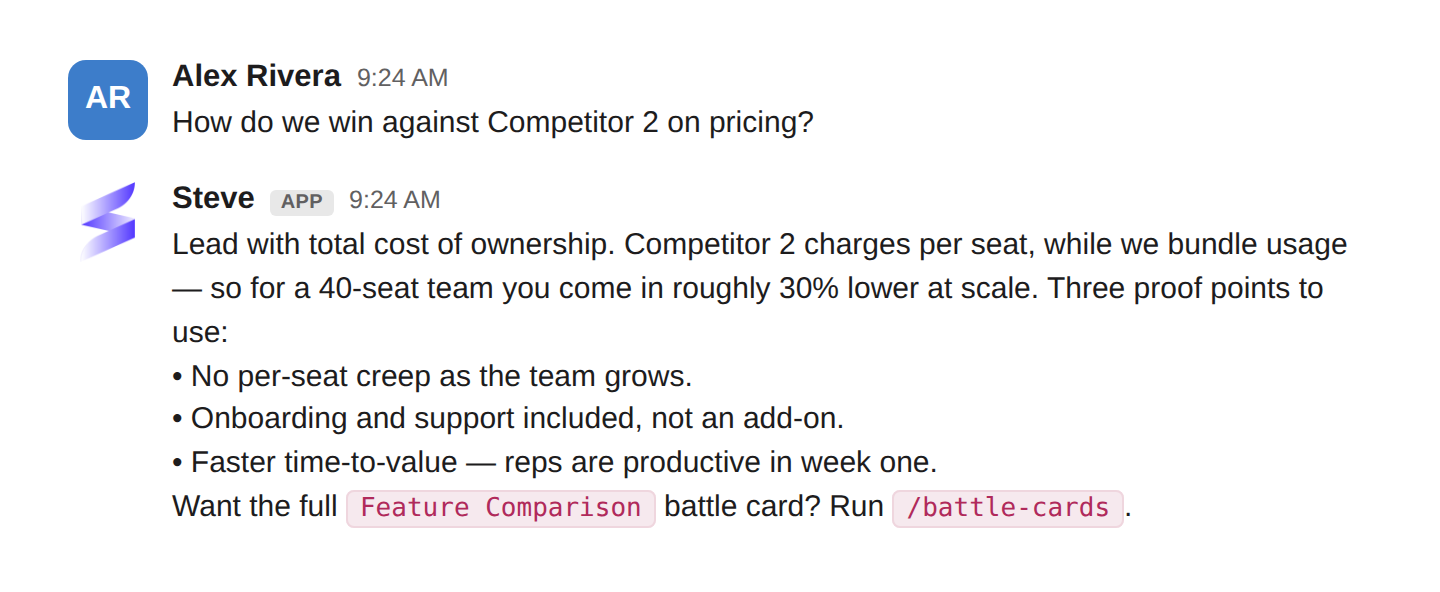
Caption: Ask in plain language; Steve answers in the thread with proof points and a next command.
Best ways to use it
🎯 For sales reps
- Ask mid-deal questions in plain language: "How do we win against [competitor] on pricing?" or "What's our answer when they say we're too expensive?"
- Pull a proof point fast, right before a call, without opening the app.
- Keep a running DM thread per deal, so each follow-up builds on the last.
📣 For PMM
- Stress-test coverage. Ask the questions you expect reps to ask and see whether Steve answers well; gaps tell you what intel to add next.
- Answer a rep in-channel by looping in
@Steveinstead of writing the reply yourself.
Tips
- DMs keep context — treat a DM like a conversation, not a search box.
- Channels stay clean — Steve threads its replies, so @mentioning it in a busy channel won't create noise.
- The better the intel in your project, the sharper the answers.
Next Steps
- Prep with /prep — when the question is "who am I meeting?" (add-on)