Step 4: Share Battle Card
Distribute battle cards to your sales team via shareable links or email
Steve Documentation Team
onboardingbattle-cardssharing
Share battle cards with your sales team so they can access competitive intelligence during customer conversations. Battle cards can be shared via link or email.
How to Share a Battle Card
- Open any generated battle card
- Click the Share button in the top-right
- Choose Copy Link to get a shareable URL
- Paste the link anywhere (Slack, email, CRM notes)
Alternatively, select Email from the share menu to send directly to team members' inboxes. Recipients don't need a Steve account to view shared battle cards.
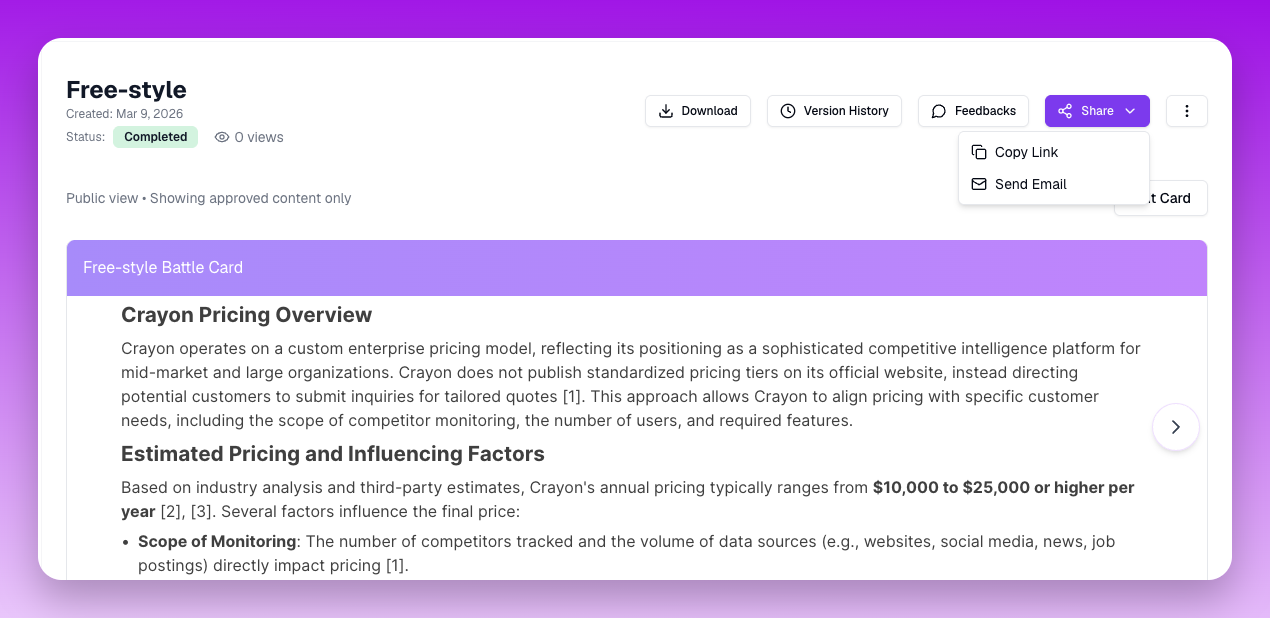 The Share button dropdown with link and email sharing options
What Happens Next
Anyone with the link can view the battle card in read-only mode. You can revoke access at any time by making the battle card private.