Step 6: Create Battle Card Templates
Build reusable battle card templates to generate consistent competitive content
Steve Documentation Team
onboardingbattle-cardstemplates
Templates (called "Presets") define the structure and sections for battle cards. Create templates to generate consistent battle cards quickly across multiple competitors.
How to Create a Preset
- Navigate to Battle Cards > Presets in the sidebar
- Click the New Preset button
- Select battle card type (e.g., Feature Comparison, Why We Win)
- Choose which competitors to include
- Select sections to include (pricing, features, objections, etc.)
- Name your preset and save
Presets can be reused to generate battle cards for new competitors automatically, ensuring consistent formatting and content structure across your sales team.
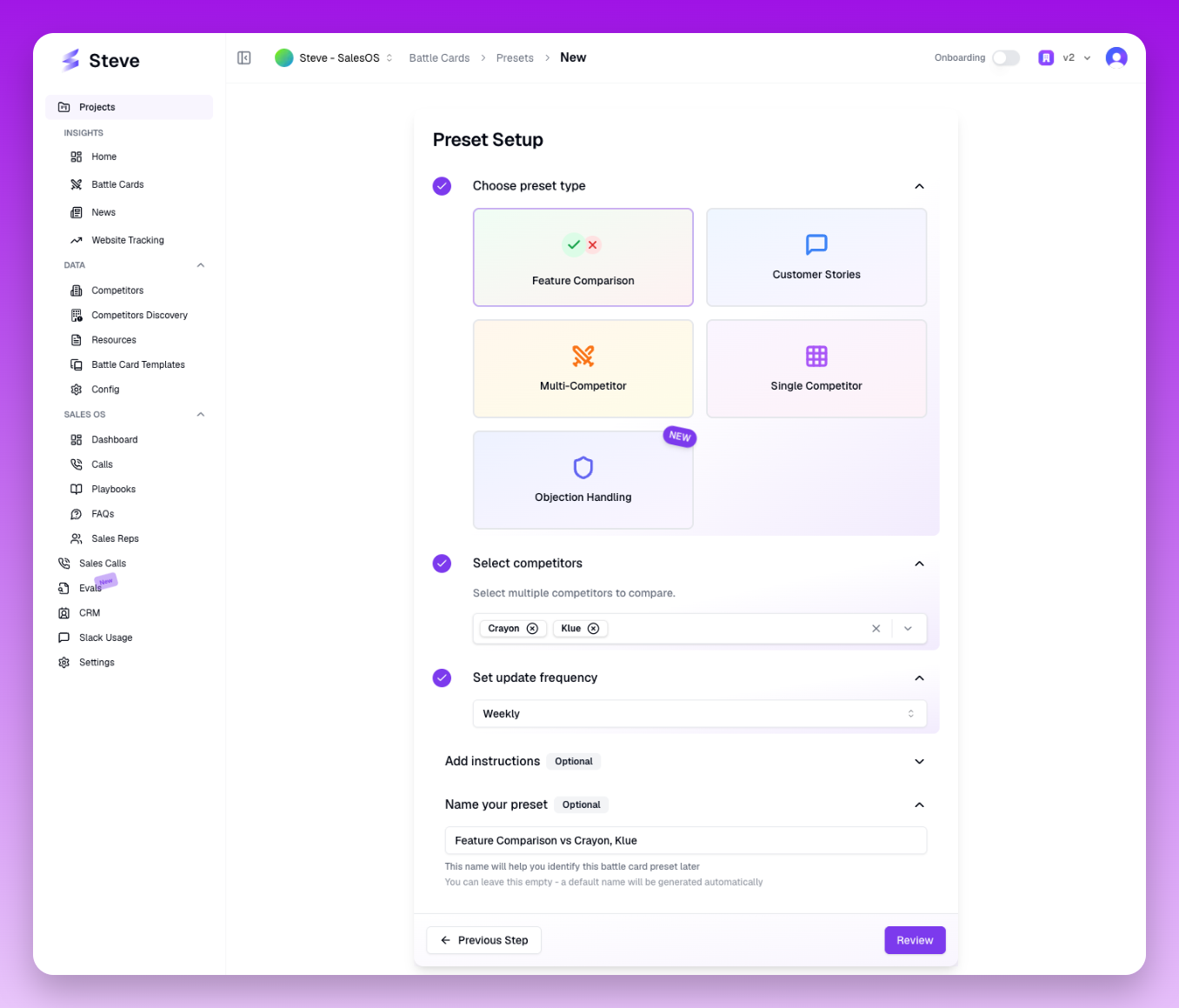 The preset creation wizard guides you through selecting type, competitors, and sections
What Happens Next
Saved presets appear in your Presets library. Use them to quickly generate new battle cards without manually configuring sections each time.