Battle Cards in Zoom with /battle-cards
Pull your team's battle cards into Zoom Team Chat, grouped by type, in the middle of a deal
Overview
/battle-cards pulls your team's battle cards into Zoom, grouped by type, so the objection handling, proof points, and feature comparisons are one command away in the middle of a deal.
Who it's for: 🎯 Sales Rep to use in the moment · 📣 PMM to curate what reps see.
Use case: A rep is on a live deal against a known competitor and needs the current battle card — objection handling, differentiators, traps — in seconds.
Prerequisites
- A Steve project with published battle cards (only live, shareable cards are returned)
- The Steve bot added to the channel, if you're running it in a channel
How to use it
/battle-cards
In a channel, address the bot instead: /steve battle-cards or @Steve battle-cards
- Steve posts a filter card. Select the project — if you're assigned to exactly one project, Steve picks it for you and goes straight to the filters.
- Refine with competitor, battle card type, and duration (All, Today, Last 7 / 30 / 90 days).
- Press Submit — or Cancel to back out.
- Steve replaces the card with the results, grouped by preset type, each with a View card link.
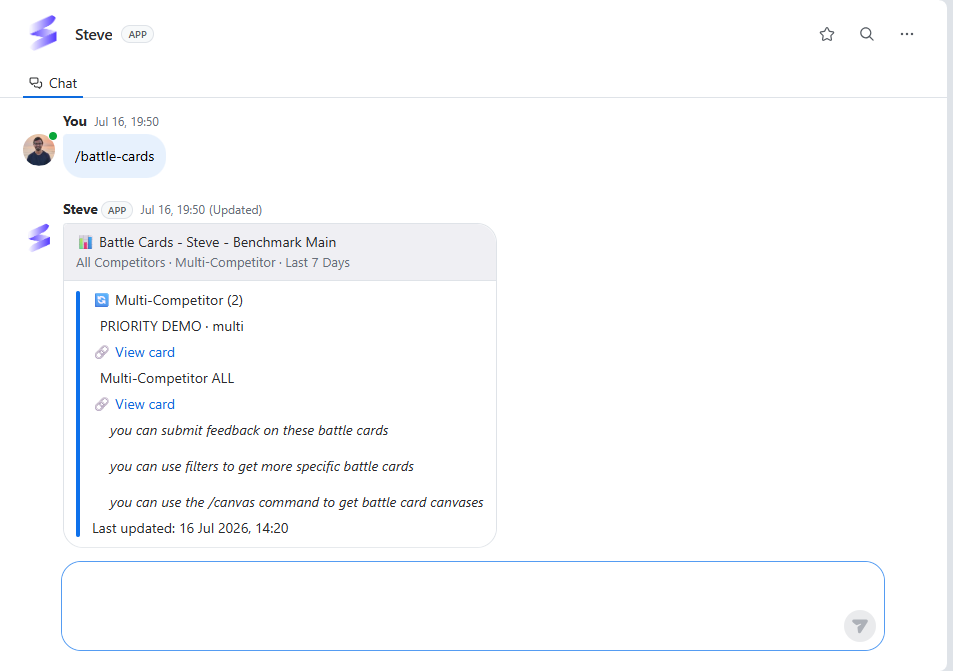
Caption: Battle cards grouped by preset type — for example ⚡ Feature Comparison and 🏆 Why We Win — each with a link, plus helpful next steps at the bottom.
Steve closes the results with a few reminders: you can submit feedback on any battle card, tighten the filters for a more specific set, and run /canvas to open the full canvases behind these cards.
If no card matches your filters, Steve says "No battle cards found for the selected filters. Please adjust your filters and try again." If cards match but none of them is published and shareable, it says "No published battle cards found for this project."
Best ways to use it
🎯 For sales reps
- Fire it when an objection lands; get the pre-written response instead of improvising.
- Use the filters to jump straight to the card type you need rather than scrolling.
- Leave feedback on a card when a call doesn't match what's written; that's how the cards get better.
📣 For PMM
- The cards reps pull here are the ones you build and maintain. Rep feedback from
/battle-cardsis your signal for what to sharpen. - Keep card types consistent across competitors so reps always know where to look.
- A card only appears here once it's published and shareable — check that before telling the field it's live.
Next Steps
- Browse Canvases — the full canvas behind these cards.