Turn Slack Chatter into Intel with Intelligence Detection
Steve watches your channels for competitive intel and offers to save it to a project in one tap
Overview
Field intel usually dies in a Slack thread. Intelligence detection catches it. When someone mentions a competitor or a piece of competitive intel in a channel Steve watches, Steve replies and offers to save it to the right project's resources, no form, no copy-paste.
Who it's for: 🎯 Sales Rep who hears it first · 📣 PMM who owns the intel library.
How it works
When a message in a monitored channel looks like competitive intelligence, for example "I just heard our biggest competitor had a major outage," Steve replies in the thread and asks whether to keep it.
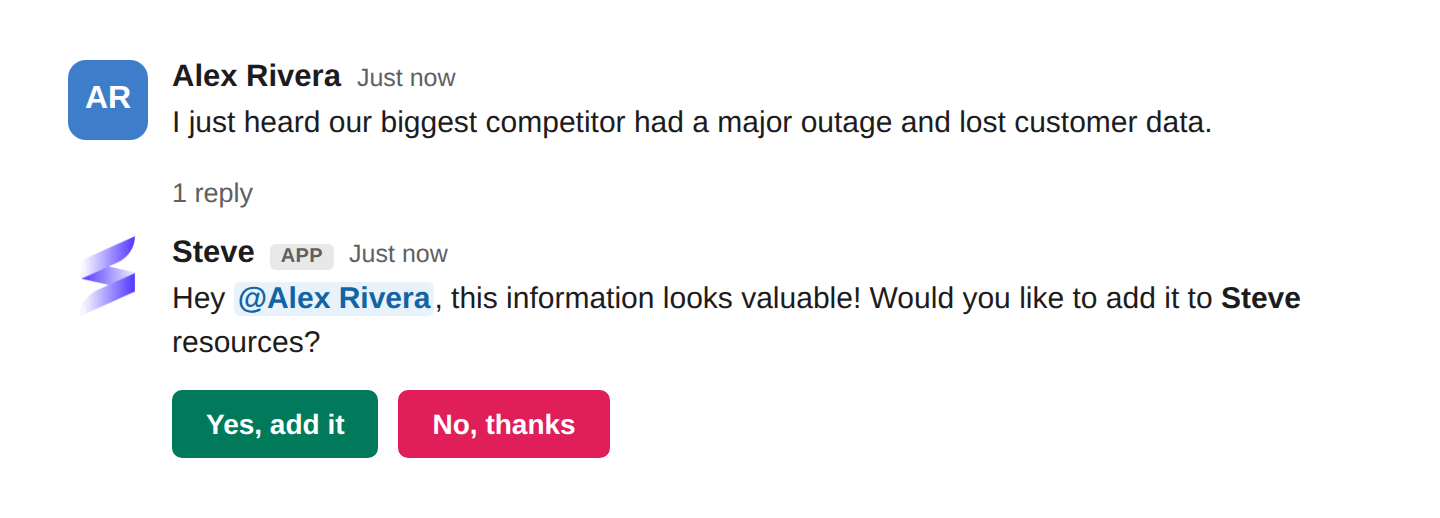
Caption: Steve spots the intel, then asks before saving — one tap on Yes, add it and it's in your project.
- Tap
Yes, add itand Steve files the message as a resource on the matching project, where it feeds battle cards, prep, and answers. - Tap
No, thanksand Steve drops it, nothing is saved. - The intel is saved to the project the channel belongs to — each intelligence channel is set up on one project.
- Mentions aren't scanned. A message that @mentions Steve is answered as a question instead.
Set it up
An admin points Steve at the channels to watch:
- Open the project's Settings → Communication, choose Slack, then Intelligence Channels.
- Add one or more Slack channels as the project's Slack Intelligence Channel.
- Save. Steve now watches those channels and offers to capture intel it sees.
Only channels you list are monitored, so you control exactly where Steve is listening.
Best ways to use it
🎯 For sales reps
- Drop what you hear on calls straight into the deal channel; let Steve decide if it's worth keeping.
- Say yes to the small stuff too, pricing hints and objections compound into better battle cards.
📣 For PMM
- Point intelligence detection at your busiest deal and competitor channels so field signal doesn't evaporate.
- Review what reps capture; it's a live feed of what's actually happening in deals.
Next Steps
- Competitor News with /latest-news — the outbound half: news Steve brings to you.
- Slack News Summary — schedule competitor updates into a channel.
- Chat with Steve — ask what a new piece of intel means for a deal.