Chat with Steve in Zoom
Ask Steve anything in Zoom Team Chat with a direct message, or /steve or @Steve in a channel, no command needed
Overview
The simplest way to use Steve in Zoom is to talk to it. No command to remember, just type. Steve reads your question, runs it against your competitive knowledge base, and answers in the thread.
Who it's for: 🎯 Sales Rep · 📣 PMM — anyone with a question about a competitor or a deal.
Use case: You're mid-conversation with your team and need an answer from your competitive knowledge base — positioning, pricing objections, feature comparisons — without switching to another tab.
Prerequisites
- Steve for Zoom Team Chat added and showing Connected in Steve → Settings → Zoom
- At least one Steve project with content
- In a channel: the Steve bot must be a member of that channel
How to use it
Two ways to ask:
- Direct message. Open a DM with Steve and type your question in plain language.
/steveor@Stevein a channel. In a channel you must address the bot so it knows the message is meant for it — start with/steve(/steve how do we win against Rival CI on pricing?) or @mention it (@Steve how do we win against Rival CI on pricing?).
Steve then:
- Narrows the project. If you're assigned to exactly one project, Steve answers straight away. If you aren't assigned to a project, Steve checks whether your question names a competitor your organization tracks and narrows to that competitor's project. If more than one project is still possible, it posts a project picker — choose one and Steve resumes your question against it.
- Answers in place. The "Thinking…" card is replaced by the answer, with links where they help.
- Keeps going in the thread. Reply in the same thread and Steve remembers the conversation, so follow-ups build on the last answer.
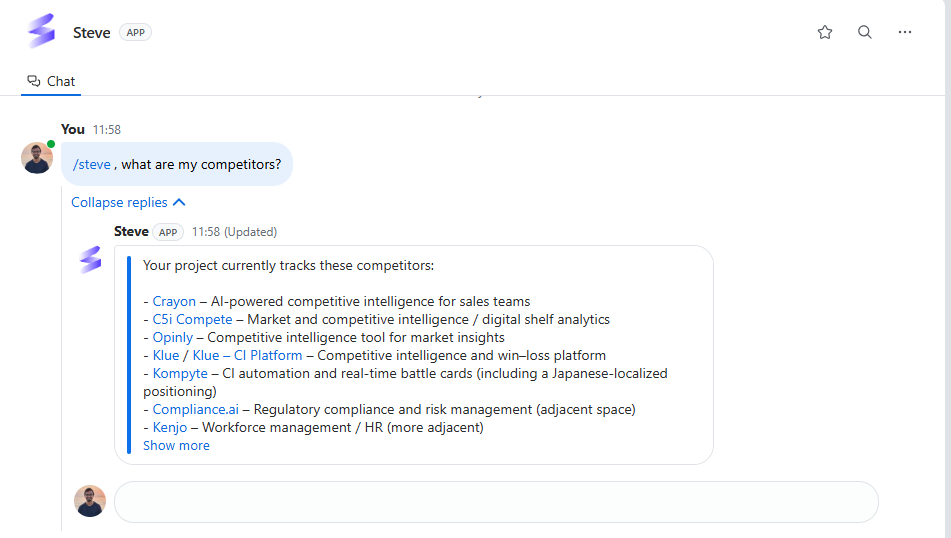
Caption: Ask in plain language; Steve answers in the thread with proof points and a suggested next command.
Long answers are continued as replies in the same thread, so nothing gets cut off.
Best ways to use it
🎯 For sales reps
- Ask mid-deal questions in plain language: "How do we win against [competitor] on pricing?" or "What's our answer when they say we're too expensive?"
- Pull a proof point fast, right before a call, without opening the app.
- Keep a running thread per deal, so each follow-up builds on the last.
📣 For PMM
- Stress-test coverage. Ask the questions you expect reps to ask and see whether Steve answers well; the gaps tell you what intel to add next.
- Answer a rep in-channel by running
/steve <their question>instead of writing the reply yourself.
Tips
- Threads keep context — treat a thread like a conversation, not a search box.
- Channels stay clean — Steve replies in threads, so running
/stevein a busy channel won't create noise. - The better the intel in your project, the sharper the answers.
Next Steps
- Prep with /prep — when the question is "who am I meeting?" (add-on)
- Battle Cards in Zoom — the pre-written objection handling.