Confluence Integration with Steve
Connect Confluence to Steve through Atlassian's Rovo MCP server — enable API token authentication, add the connector, and scope its tools
Overview
Confluence connects to Steve as an external MCP connector pointed at Atlassian's Rovo MCP server. Once it's connected, Steve can search your spaces and pull page content into battle cards, Canvas blocks, and Insights replies.
One URL, one API token, one email — plus one toggle your Atlassian org admin has to flip first. That toggle is where almost every failed setup stops.
Who it's for: 📣 PMM / Steve org manager — with an Atlassian organization admin for Step 1.
What you'll need
| Requirement | Notes |
|---|---|
| Steve organization manager role | The Connectors tab is org-manager only |
| An Atlassian org admin | Only they can turn on Allow API token authentication (Step 1) |
| Atlassian account email | The email that owns the API token |
| An Atlassian API token | Created in Step 2 |
| Confluence Cloud | mcp.atlassian.com serves Cloud sites only — Server and Data Center aren't supported |
The connection details
| Setting | Value |
|---|---|
| Remote MCP server URL | https://mcp.atlassian.com/v1/mcp |
| Account email | The Atlassian account that owns the token |
| Token | The Atlassian API token |
| Auth header Steve sends | Authorization: Basic base64(email:token) |
Steve switches to HTTP Basic automatically for any atlassian.com URL, because that's the only mode in which Atlassian returns its full toolset. The older /v1/sse endpoint is deprecated — use /v1/mcp.
Step 1: Turn on API token authentication (Atlassian org admin)
This is the actual blocker. Rovo MCP ships with OAuth 2.1 on and Allow API token authentication off. Steve authenticates with an API token, so until an org admin turns this on, every attempt fails at the first request — no tools, no connector.
- Sign in to admin.atlassian.com.
- Select the organization (if there's more than one).
- Go to Rovo → Rovo MCP server.
- In the Authentication section, turn Allow API token authentication on.
The same page is also reachable at Security → Rovo MCP server.
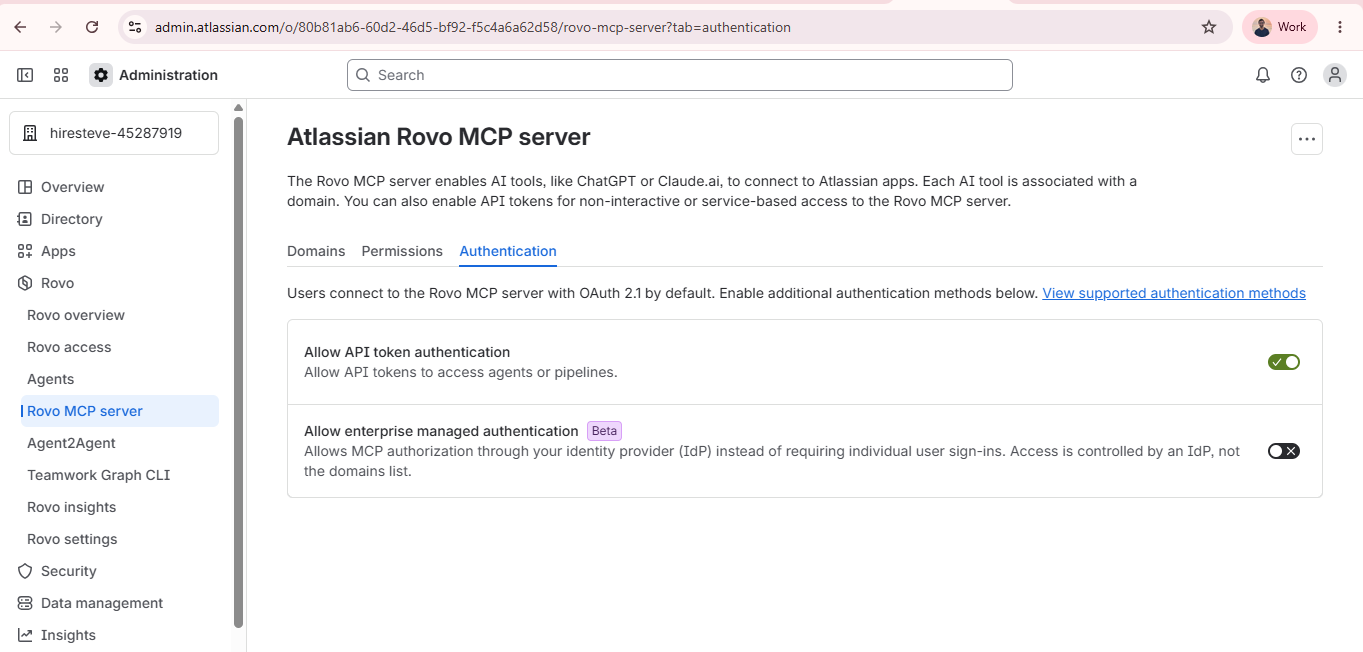
Caption: Rovo → Rovo MCP server → Authentication. Allow API token authentication must be on before Steve can connect.
Confirm it's on before moving to Step 2 — a correct token against an org with this setting off still fails, and the error looks identical to a bad token.
Step 2: Create the API token
- Sign in as the account Steve should use, and open id.atlassian.com/manage-profile/security/api-tokens.
- Click Create API token. If you're offered scopes, include the Confluence read scopes (add write scopes only if Steve should create or edit pages).
- Name it something recoverable, for example Steve MCP connector.
- Copy the token now — Atlassian shows it once.
Use a shared service account, not your personal one. The token inherits that account's Confluence permissions — Steve sees exactly the spaces and pages that account can see, and nothing else. A personal token breaks the day that person leaves.
Step 3: Add the connector in Steve
- Open Settings → Connectors (or
/settings#connectors). - Click Add Connector.
- Fill in the dialog:
| Field | Value |
|---|---|
| Name | Confluence |
| Remote MCP server URL | https://mcp.atlassian.com/v1/mcp |
| Account email | The email that owns the token — this field appears automatically for atlassian.com URLs |
| Token | The API token from Step 2 |
| Description | Optional, e.g. Product wiki + release notes |
| Advanced settings | Leave empty — no OAuth client ID or secret is needed |
- Click Add.
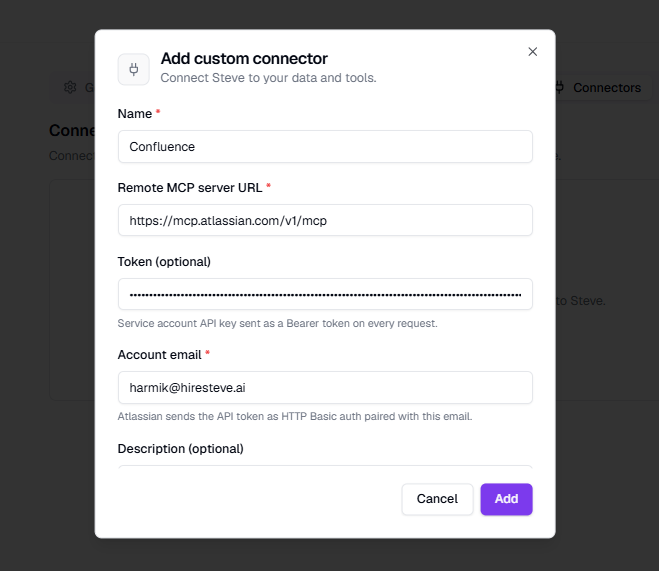
Caption: The Account email field only appears once the URL is an Atlassian one. Both it and the token are required.
Steve connects, calls tools/list, and saves the connector as Connected — you'll see a toast such as "Confluence connected · 25 tools discovered". The token is encrypted at rest and never returned to the browser.
Step 4: Make it active
A connected connector still does nothing until it's scoped. On the connector's detail panel:
- Used in projects → + Add → tick the projects that should use Confluence.
- Used in features → + Add → pick from Battle Card creation, Canvas, Insights replies.
- Tool permissions → allow what Steve needs, block the rest.
Full detail on each of these is in Configure & Manage.
Suggested tool permissions
| Tool | What it does | Suggested |
|---|---|---|
searchConfluenceUsingCql | Searches pages by CQL query | ✓ Allow |
getConfluenceSpaces | Lists the spaces the account can see | ✓ Allow |
getPagesInConfluenceSpace | Lists pages in a space | ✓ Allow |
getConfluencePage | Reads one page's content | ✓ Allow |
createConfluencePage | Creates a new page | ⊘ Block unless intended |
updateConfluencePage | Edits an existing page | ⊘ Block unless intended |
createConfluenceFooterComment | Comments on a page | ⊘ Block unless intended |
Rovo MCP also exposes Jira, Compass, and Bitbucket tools on the same connection. Block whatever you don't want in scope, or set the fallback dropdown to Always denied and allow only the rows above.
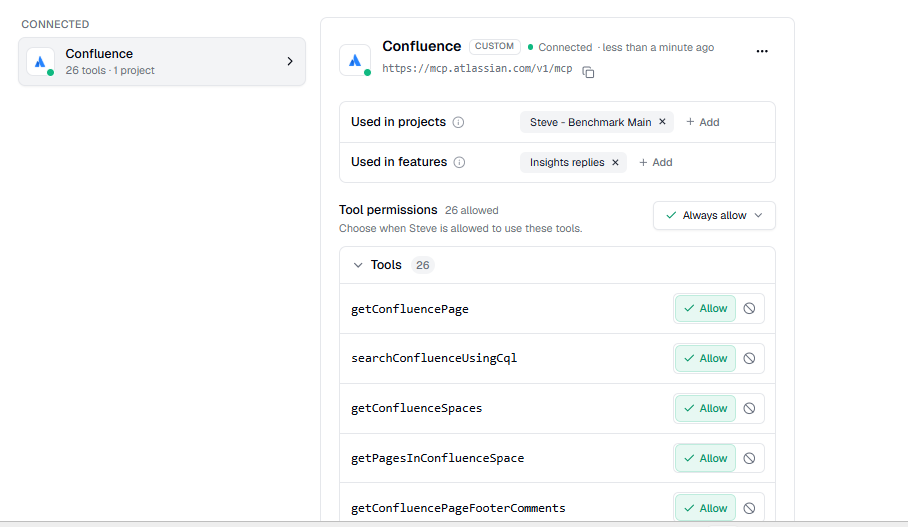
Caption: Read tools allowed, write tools blocked — a safe default for a documentation source.
A useful generation prompt
Add this to the connector's Generation prompt box so Steve reaches for the wiki at the right moment:
"Use
searchConfluenceUsingCqlto check the product wiki before answering positioning or pricing questions. Cite the page title and URL for every claim taken from Confluence."
Troubleshooting
| What you see | Cause | Fix |
|---|---|---|
| Authentication failed on Add | API token auth is off for the Atlassian org | Step 1 — org admin turns Allow API token authentication on |
| Authentication failed with the toggle already on | Wrong email, wrong token, or a revoked token | Re-create the token; confirm the email owns it |
| Connected, but no Confluence tools | The account has no access to Confluence, or can't see any space | Grant the account Confluence access and space permissions |
| Couldn't reach this MCP server | Network egress to mcp.atlassian.com is blocked | Allow the host through your proxy or firewall |
"Authentication failed" right after clicking Add
Check Step 1 first — it's the cause more often than the token is. Then confirm the Account email is the account that created the token, and that the token hasn't been revoked.
Connected, but Steve never cites Confluence
The connector is probably not scoped. Confirm it has a project chip and a feature chip for the surface you're using, and that the read tools are set to Allow.
Tools disappeared after an Atlassian change
Open the ⋯ menu → Test connection. It re-validates the credentials and refreshes the tool list, keeping your Allow/Block choices.
The connector sits in "Needs attention"
Connectors in that group are skipped at generation time. Test connection surfaces the current error; work it back through the table above.
Expected Outcome
- ✅ Allow API token authentication is on in the Atlassian org's Rovo MCP server settings
- ✅ The Confluence connector shows under Connected with its tools listed
- ✅ At least one project chip and one feature chip on the connector
- ✅ Confluence read tools are Allow; write tools are Block unless you want them
Next Steps
- Configure & Manage — projects, features, tools, and prompt in depth.
- Overview — where connectors run.
- Add a Connector — the generic flow for any other MCP server.