HubSpot: Overview
What the HubSpot integration syncs into Steve, who it's for, and how to get set up
Overview
The HubSpot integration connects your HubSpot CRM to Steve. Once it's authorized, Steve imports your deals and companies, keeps them in sync, and turns every deal into a place where competitive intelligence lives: the competitors on the deal, the battle cards for those competitors, the calls attached to it, and the documents your team has uploaded against it.
It is a two-way integration. Steve reads deals and companies out of HubSpot, and writes back to HubSpot deal properties, the deal activity timeline, and call engagements.
Who it's for: 📣 PMM / admin to connect and configure it · 🎯 Sales Rep to work the deals once they're in.
Everything described here happens in the Steve app at app.hiresteve.ai.
Documentation map
| If you want to… | Read |
|---|---|
| Add the app — prerequisites, the OAuth flow, the scopes Steve requests, and how to verify it worked | HubSpot Account Requirements → Connecting HubSpot |
| Finish setup — create the Steve custom properties in HubSpot, then map them | Field Setup Instructions → Field Mapping and Property Selection |
| Understand the sync — what's imported, how often, full vs. incremental | How Deals and Companies Sync |
| Work the data — search, filter, edit, assign projects and competitors, bulk actions | The Deals Table · The Companies Tab |
| Use the AI features — suggested projects and competitors, battle card links, deal chat, resource insights | Deal Suggestions · Connected Battle Cards · Connected Calls and Deal Chat · Deal Resources and Insights |
| Push playbook data into HubSpot — AI-extracted fields written to deal properties, call logs, and companies | CRM Field Extraction |
| Fix a problem | Troubleshooting · FAQ |
| Remove the integration | Disconnecting HubSpot |
| Talk to us | Support |
What gets synced
| From HubSpot | Into Steve |
|---|---|
| Deals — name, stage, type, amount, currency, close date, pipeline, description, created and modified dates | A deal record in the Deals table |
| Every deal property you select during setup | Extra columns on the deals table and in the deal details dialog |
| Companies — name, domain, industry, description, phone, city, state, country, zip, website, employees, annual revenue, lifecycle stage, owner | A company record in the Companies tab |
| — | AI deal suggestions: a suggested project and suggested competitors for every newly imported deal |
| From Steve | Back into HubSpot |
|---|---|
| Competitor annotations on a deal | Your mapped competitor property |
| Public battle card links for those competitors | The steve_connected_battle_cards property and a note on the deal activity timeline |
| Calls annotated to the deal in Sales OS | The steve_connected_calls property, plus a Call engagement on the deal timeline |
| Steve Channels, Steve Usage, Win Reason, and Loss Reason edits | Your mapped deal properties |
| AI-extracted playbook fields | Mapped deal properties, deal call logs, company properties, and company call logs |
How it fits together
HubSpot CRM
      ↓  OAuth authorization (started from Steve's settings)
Steve imports deals + companies  (daily, plus on demand)
      ↓
Deals table  →  assign a project  →  annotate competitors
      ↓                                     ↓
AI deal suggestions              Battle card links written back
(project + competitors)          to the HubSpot deal + timeline note
      ↓
Deal resources, connected calls, deal chat, playbook field extraction
Where HubSpot data appears in Steve
| Page | What you'll find |
|---|---|
CRM at /crm | The HubSpot tab next to Salesforce — deals and companies, with a settings toggle. |
HubSpot at /hubspot | The standalone HubSpot dashboard: connection status, action buttons, and the Deals and Companies tabs. |
Field Setup Instructions at /hubspot/instruction | Create the Steve custom properties in HubSpot, manually or automatically. |
Field Mapping at /hubspot/setup | Map Steve fields to HubSpot deal properties and choose which properties to sync. |
Deal Analysis at /hubspot/deal-suggestion | Review, edit, approve, or reject AI-suggested projects and competitors. |
Settings → HubSpot at /settings?tab=hubspot | Connect, re-integrate, and delete the integration. |
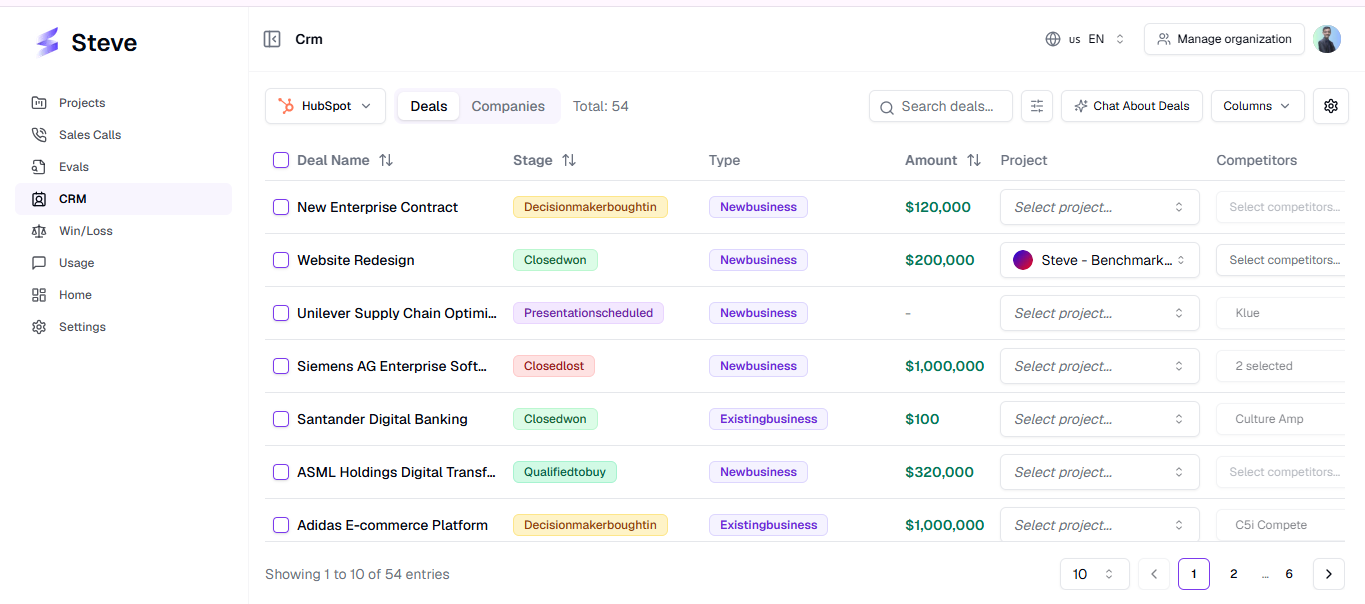
Caption: The HubSpot dashboard — connection status on top, Deals and Companies tabs below.
Set up in four steps
- Check the HubSpot requirements — plan, permissions, and roles.
- Connect HubSpot — one OAuth authorization, started from Steve's settings.
- Create the Steve properties — six custom deal properties, created for you in one click or by hand.
- Map the fields — tell Steve which HubSpot property is which, and pick the properties to sync.
Connecting alone imports your deals. Steps 3 and 4 are what make the two-way features — competitor annotation, battle card links, win and loss reasons — actually work.
What Steve accesses in HubSpot
Steve requests these OAuth scopes, and nothing else:
| Scope | Why Steve needs it |
|---|---|
oauth | Required by HubSpot for any OAuth app. |
crm.objects.deals.read | Read your deals and their properties. |
crm.objects.deals.write | Write competitor annotations, battle card links, connected calls, and extracted field values back onto deals. |
crm.schemas.deals.read | List available deal properties so you can map them. |
crm.schemas.deals.write | Create the Steve custom deal properties for you. |
crm.objects.companies.read | Import companies. |
crm.objects.companies.write | Write extracted field values back onto companies. |
crm.schemas.companies.read | List available company properties for playbook field mapping. |
crm.schemas.companies.write | Create custom company properties when a playbook needs them. |
crm.objects.contacts.read | Resolve a deal's primary contact — used for win/loss surveys and company matching. |
crm.objects.contacts.write | Create and update the notes and call engagements Steve writes to the deal timeline. |
Steve never deletes your HubSpot records, never touches tickets, quotes, or marketing objects, and never reads HubSpot email or marketing content.
Next Steps
- HubSpot Account Requirements — start here.
- Connecting HubSpot — the OAuth flow, step by step.
- Field Setup Instructions — create the Steve properties.
- Field Mapping and Property Selection — finish configuration.