Zoom Revenue Accelerator: Overview
What the Zoom Revenue Accelerator integration imports into Steve, who it's for, and how to get set up
Overview
Zoom Revenue Accelerator (ZRA) is Zoom's conversation intelligence add-on. It records and analyzes your Zoom Meetings and Zoom Phone calls. Connect it to Steve and every conversation ZRA has processed flows into Steve automatically — the recording metadata, the participants, and the full transcript.
Once a call is in Steve, it shows up in Sales Calls with an AI brief and key points, its transcript is searchable, and any competitor mentioned in it becomes a competitive insight you can approve into a project.
Who it's for: 📣 PMM / admin to connect it · 🎯 Sales Rep to use the calls once they're in.
Everything described here happens in the Steve app at app.hiresteve.ai.
This is not the Zoom Team Chat bot. Zoom Revenue Accelerator is a separate Zoom app with separate permissions. It imports call recordings; it does not read or post messages. For the chat bot, see Steve in Zoom Team Chat.
Our app on Zoom. Zoom RA connects through our Steve Call Insights app on the Zoom App Marketplace. The listing is for reference only — the actual configuration is done from Steve's Settings → Call Recording → Zoom RA page.
Documentation map
| If you want to… | Read |
|---|---|
| Add the app — prerequisites, step-by-step setup, the permissions Steve requests, and how to verify it worked | Adding the App, after Zoom Account Requirements |
| Use the app — how imports run, where calls appear, how to read and search them, and what Steve extracts | How Calls Are Imported · Viewing Calls in Sales Calls · Transcripts, Briefs & Key Points · Competitive Insights |
| Fix a problem — connection errors, missing calls, empty transcripts | Troubleshooting · FAQ |
| Remove the app — full de-authorization, what stops working, and how your data is handled | Removing the App |
| Talk to us | Support |
What gets imported
| From Zoom | Into Steve |
|---|---|
| Recorded Zoom Meetings and Zoom Phone calls processed by ZRA | A call record in Sales Calls |
| Conversation topic, start time, duration, call type (video / phone) | Call title, timestamps, and metadata |
| Participants and their role on the call | Participant list, tagged Internal or External |
| Per-participant transcripts | A single chronological, speaker-attributed transcript |
| — | An AI-generated brief and key points, written in your organization's language |
| — | Competitive insights for every competitor mentioned |
As of 2026 ZRA also ingests conversations from Microsoft Teams, Google Meet, and in-person meetings recorded through Zoom's external recorder. Those land in ZRA alongside Zoom's own calls, so Steve imports them too — no extra configuration.
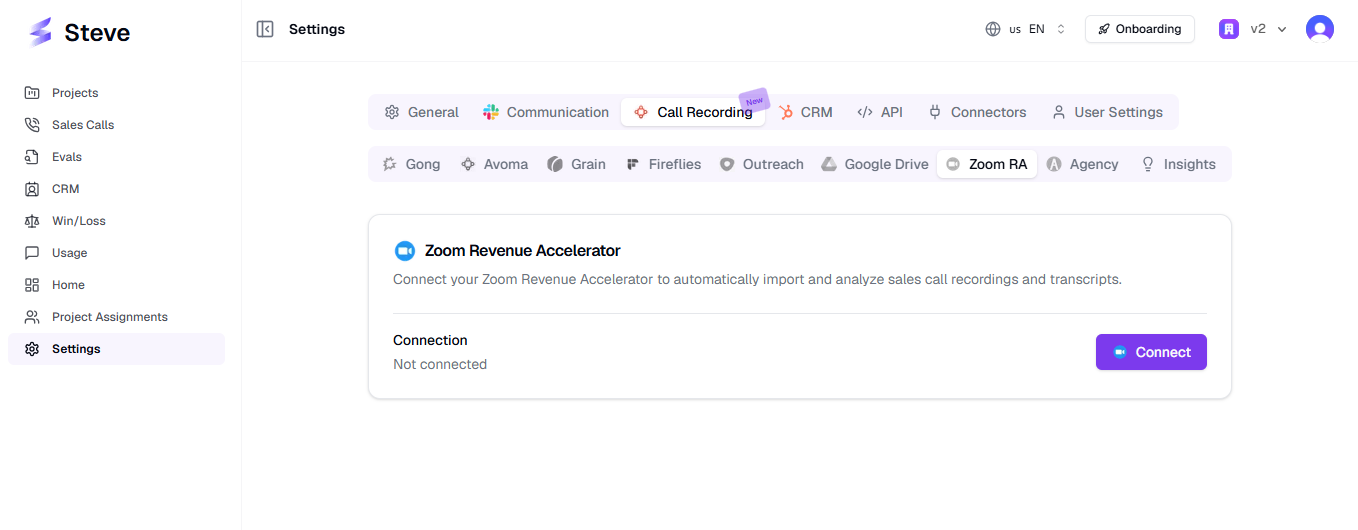
Caption: Settings → Call Recording → Zoom RA is where the integration lives.
How it fits together
Zoom Meetings / Zoom Phone
        ↓  recorded + transcribed
Zoom Revenue Accelerator processes the conversation
        ↓  Steve imports it
Sales Calls  →  brief, key points, transcript, participants
        ↓
Competitor detection  →  insights pending approval
        ↓
Approved insights become project resources Steve can answer from
Where Zoom RA data appears in Steve
| Page | What you'll find |
|---|---|
| Sales Calls | Every imported conversation, filterable by source, call type, and sales rep. Search across all transcripts. |
| Call Brief drawer | The AI brief and key points for a single call. |
| Projects → Resources → Zoom RA | Approved competitive insights extracted from Zoom calls. |
| Projects → Triage Insights → Zoom Revenue Accelerator | Insights waiting for a decision. |
| Settings → Call Recording → Zoom RA | Connection status, connected email, and disconnect. |
Before you start
Zoom Revenue Accelerator is a paid Zoom add-on, not part of a standard Zoom plan. Most failed setups are licensing, not configuration.
Read Zoom Account Requirements first — it lists exactly what has to be true on the Zoom side before a single call can import.
Set up in three steps
- Check the Zoom requirements — plan, ZRA licenses, cloud recording, transcription.
- Add the app — one OAuth authorization, started from Steve's settings.
- Watch the first import land — the first run backfills three months of conversations.
What Steve accesses in Zoom
Steve requests read-only access, and calls exactly three Zoom APIs:
| What Steve reads | Zoom API |
|---|---|
| The list of conversations Revenue Accelerator has processed | GET /v2/zra/conversations |
| Each conversation's participants and transcript | GET /v2/zra/conversations/{conversationId}/interactions |
| Your basic profile — email, user ID, account ID — to link the Zoom account to your Steve organization | GET /v2/users/me |
Steve cannot start, stop, edit, or delete recordings; create, change, or join meetings; read Zoom Team Chat messages; or write anything at all into Zoom.
Imported calls, transcripts, briefs, and insights are stored scoped to the Steve organization that imported them and are readable only inside it. Zoom credentials are deleted the moment you disconnect. See Adding the App for what is stored, and Removing the App for how to delete it.
Next Steps
- Zoom Account Requirements — start here.
- Adding the App — prerequisites, the OAuth flow, and permissions, step by step.
- How Calls Are Imported — sync windows, deduplication, and what happens to each conversation.
- Viewing Calls in Sales Calls — filters, search, and the call table.
- Transcripts, Briefs & Key Points — how the transcript is assembled and where to read it.
- Competitive Insights from Zoom Calls — approval and triage.
- Removing the App · Troubleshooting · FAQ · Support